
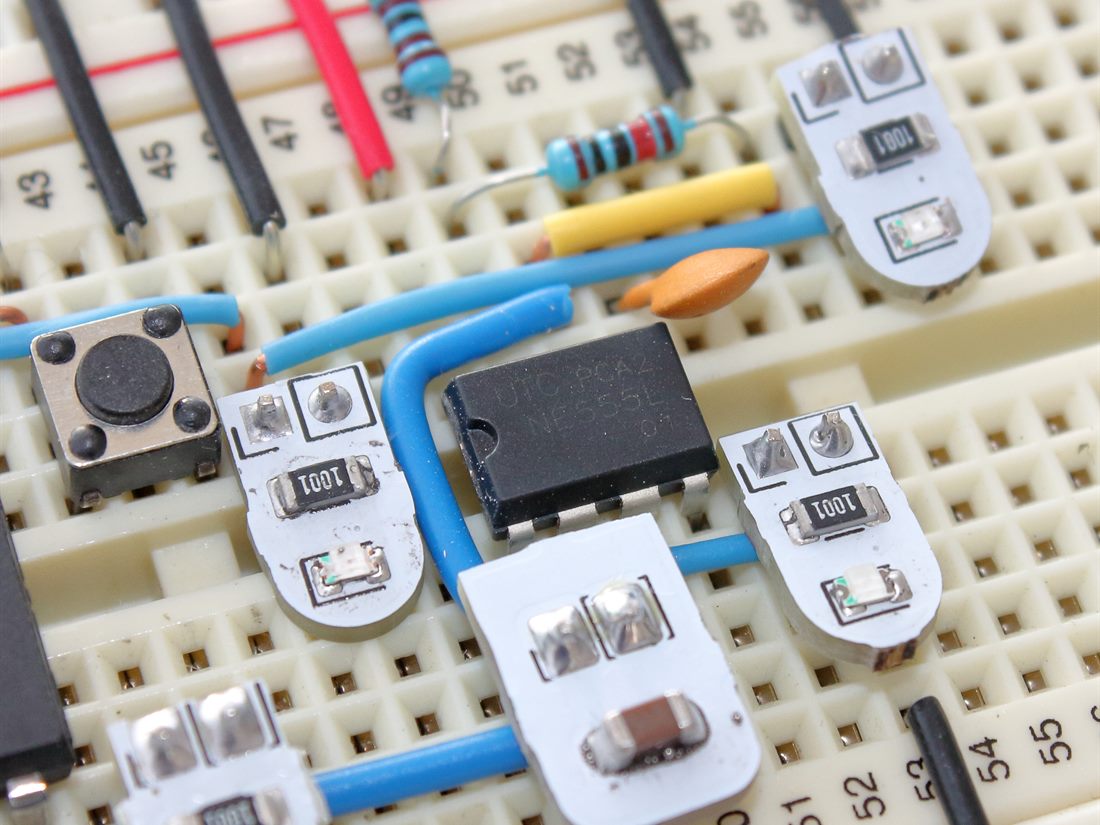
The problem with a bare LED
An LED needs a series resistor to limit current. On a breadboard that means two components and a spare row for every status light you want, plus remembering the LED's polarity each time. Multiply that across a busy prototype and it becomes clutter that hides the circuit you actually care about.
The design
The fix is a small PCB with everything integrated:
- An SMD LED and a matching SMD resistor in series, so the current limiting is built in.
- Two 0.1-inch pins so it drops straight into a breadboard or header — signal and ground.
- Clear silkscreen marking polarity, so there's no guessing which way round it goes.
I laid it out in KiCad, keeping the outline tiny so a strip of them takes almost no space on the panel — which also keeps the per-unit cost down when you order them in quantity.
The best tools are the ones that remove a small friction you'd stopped noticing. These turn "wire an LED and a resistor" into "push in one board."
Choosing the resistor value
The resistor sets the brightness and the current. For a simple 5 V logic indicator, a value in the region of a few hundred ohms to about a kilohm gives a clearly visible light without loading the driving pin. I settled on a value bright enough to read across the bench but gentle enough to hang off a microcontroller GPIO directly.
Why make your own
You can buy pre-made indicator modules, but designing your own means they are exactly the size, colour, and value you want — and it turns a recurring annoyance into a finished thing you use every day. It is also a low-risk way to practise the full PCB flow end to end, from schematic to a board in your hand, which then scales up to bigger projects.
Great starter PCB project: a two-pad board with one LED and one resistor teaches the whole KiCad workflow with almost no risk, and you end up with tools you'll actually reuse.